Turo Trip Extensions for Hosts: How They Work, What They Pay, and When to Say No
On Turo, extensions go through the app, often without you, and the added days don't inherit the original trip's duration discount. Here is how an extension reaches you, what it pays, what happens to the miles, and the settings that decide it.

2026 update: a Turo trip extension now runs almost entirely through the app. The guest submits a trip change request, which they can do before the trip, during it, or up to 24 hours after the scheduled end. Turo approves it automatically if your car is free and the new time fits your settings; only conflicts land with you. Anything you agree in messages doesn't count. And the added days are priced on their own: they don't inherit the original trip's duration discount, so an extension usually pays more per day than the same total booked upfront.
The old advice on extensions was about manners: check your calendar, say yes warmly, process it through Turo. That last part still matters, but most extensions in 2026 never ask for your opinion. What you control is the settings that decide which requests are approved without you, and knowing what the money and the miles look like when they are. This guide covers both, from Turo's US help pages as checked in November 2026.
How an extension reaches you
The request starts in the guest's app (Trips → Manage trip → Change trip, or Dates and location on the trip page). Turo's system then sorts the request into one of three outcomes, according to its host page on trip changes:
| What Turo sees | What happens | Who decides |
|---|---|---|
| Car has calendar availability, isn't restricted or unlisted, and the new time fits advance notice, pickup and return hours, trip buffer and trip duration | Extension is made automatically | Turo |
| Car unavailable or restricted, or the request conflicts with one of those settings | Request is sent to you to accept or decline | You |
| Car unavailable, unlisted or restricted, or the new end time cuts into your trip buffer | Guest can't submit the request at all | Nobody |
Turo's own example is a useful one. A guest wants to move the return from 7 pm to 9 pm. If your pickup and return hours run until 10 pm, the change goes through without you. If they end at 8 pm, it comes to you.
That makes your trip preferences the real decision-maker. A host who leaves wide-open return hours and no buffer has, in effect, pre-approved most extensions. That's fine if you want them. It isn't if a second guest is collecting the car the next morning and you need time to clean it.
On timing: Turo's guest page says most requests get an immediate answer, and that when a host has to review one, "the system will provide a response within 12 hours." If you decline or let it expire, Turo tells the guest they must return the car at the original time. The same page puts it plainly: a lack of response "does not indicate permission to extend."
Requests can also fail before they reach anyone. Turo's extension FAQ lists an outstanding balance, insufficient funds on the guest's card, and a chargeback the guest filed against Turo. Guests stuck there sometimes message the host for help, but you can't fix it for them. The payment has to clear on their side.
The one move that voids your protection
The rule hosts break most often is the friendliest one. Turo's host page says an extension has to go through its system, and that "a verbal or written agreement on your part—even in Turo messaging—isn't valid and could result in Turo voiding all protection tied to your earnings plans."
Picture the guest who writes, "Mind if I keep it till Sunday?" and the host who answers, "Sure, no problem." If that car is damaged on Saturday, the trip on Turo's books ended on Friday. Agreeing in chat costs you nothing up front and can cost you the whole protection plan later. Paying outside the platform is worse. Turo's gray market policy bans off-platform payments for extensions, along with fuel, tolls and deposits; we covered what that costs in our guide to difficult Turo guests. For a guest who simply doesn't bring the car back, see our late-return guide.
So the only reply worth sending is some version of: "Happy to, if the car's free. Please request it in the app under Change trip so you're covered."
Two smaller changes don't need a formal request. A guest can start up to one hour early if you and the car are available and you agree, and can end up to three hours early with your approval in Turo messaging. Turo says neither one changes your earnings. Ending more than three hours early goes through the system like an extension.
What an extension pays: the discount rule
This is the part most hosts haven't run the numbers on. Turo's discounts page, updated on November 20, 2026, says that when a trip paid in full received a duration discount, "we won't apply the original trip's discount to the added days. The added days may qualify for their own duration discount."
In other words, the extension is priced like a small trip of its own. Two added days don't hit a three-day discount, so they're charged at your full daily price. Ten added days get your weekly discount, not the monthly one the 30-day total would have earned upfront.
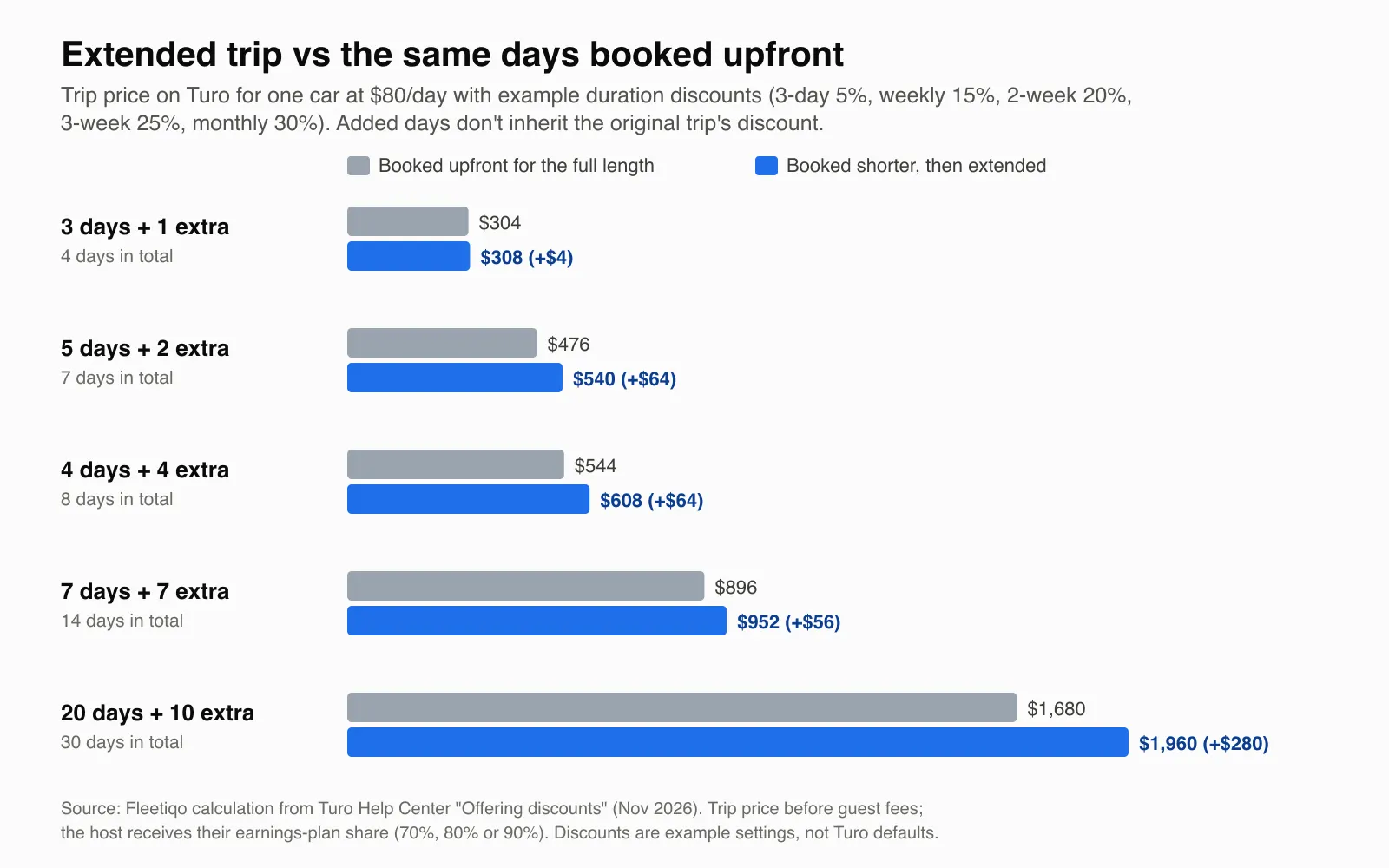
Here's what that looks like for one car at $80 a day, with example discounts of 5% for three days, 15% for a week, 20% for two weeks, 25% for three weeks and 30% for a month:
| Trip | Booked upfront | Booked shorter, then extended | Difference |
|---|---|---|---|
| 3 days + 1 | 4 days at 5% off: $304 | $228 + $80 = $308 | +$4 |
| 5 days + 2 | 7 days at 15% off: $476 | $380 + $160 = $540 | +$64 (+13%) |
| 4 days + 4 | 8 days at 15% off: $544 | $304 + $304 = $608 | +$64 (+12%) |
| 7 days + 7 | 14 days at 20% off: $896 | $476 + $476 = $952 | +$56 (+6%) |
| 20 days + 10 | 30 days at 30% off: $1,680 | $1,280 + $680 = $1,960 | +$280 (+17%) |
Your share follows your earnings plan: 70%, 80% or 90% of the trip price in the US (we compared the plans in our break-even guide). On the 80% plan, the 20-plus-10 trip pays you $224 more than the same 30 days booked as one monthly trip.
The gap is widest when the extension pushes the total across a discount tier the guest never booked, such as five days becoming seven or 20 becoming 30. It's smallest when both parts already sit in the same tier. The guest sees the added daily charges, trip fee and protection cost as separate lines before they submit, so nothing here is hidden from them. It's simply the price of not booking the longer trip in the first place.
Two other money rules come with it. If the original trip was non-refundable, the added days are non-refundable too, and they also get the 10% non-refundable discount. And if you offer free delivery for trips of a certain length, a guest who extends an in-progress trip to reach that length doesn't get it.
The rule runs the other way when a guest shortens. If a shorter trip drops below a discount threshold, Turo recalculates the discount at your current rates and charges the guest the balance, which is added to your earnings.
One caution on sources. The host page on trip changes, last updated in April 2026, says Turo will "apply any relevant discount you've set to the additional days." That sits loosely with the newer discounts page, which spells out that the added days get their own discount, not the original one. We've followed the November page, the more specific and more recent of the two.
The miles: where extensions catch people out
Distance limits follow a similar logic. Turo's distance limits page says the limit for an extension is based "only on the length of the extension". The original days keep their limit. For a standard-mileage trip, the guest page adds that an extension of fewer than 7 days uses your daily limit, 7 to 30 days your weekly limit, and more than 30 days your monthly limit.
Unlimited mileage is the exception. If an extension switches on weekly or monthly distance limits, Turo recalculates the limit for the whole trip, counting each originally booked day at 300 miles in the US and UK (500 km in Canada, Australia and France).
That surprises guests who booked a long weekend with unlimited miles, extended it into a week and are suddenly over a limit they didn't think they had. It's worth one line in your message when you see the extension come through: "Your trip now has a distance limit of X miles, it's on the trip page." That heads off a mileage invoice dispute later. We cover how weekly and monthly limits work in our road trip guide.
Late guests, maximums and monthly trips
A late guest can turn into an extending guest. Because requests are open for 24 hours after the scheduled end, Turo's additional usage policy says that if a guest extends successfully after you've reported a late return, it will disregard the report and pay you the extra earnings at payout. So report a genuinely late return promptly anyway. It costs you nothing if the guest extends. Just don't report one you can't back up: misreporting can bring a $50 violation fee.
Approving past your maximum lifts it for that guest. In the US and Australia, if you accept an extension beyond the maximum trip duration you've set, Turo's trip duration page says the guest "can continue to bypass this maximum on subsequent extensions." If you set a 14-day cap for a reason, decline the request that would break it. This doesn't apply in Canada, France or the UK, where mandatory maximum trip durations apply.
Monthly trips extend the same way. Turo's monthly terms let a guest request an extension any time after booking, subject to availability and host approval. Shortening is where monthly trips differ. A non-refundable monthly guest who shortens forfeits what they've already paid, and on "Pay as you go" trips you keep the earnings for every 30-day period already charged.
When to say no
Most extensions are good business: no handover, no cleaning, and, as the table shows, often a better daily rate than the guest would have paid by booking longer. Our view is that the cases worth declining are narrow and easy to spot:
- The next guest is close. If the new end time leaves less turnaround than you need, decline, even if your buffer technically allows it. A host cancellation on the next trip costs far more than one extra day.
- It breaks a maximum you set deliberately. Approving it once removes the cap for that guest.
- Something on the trip already feels off. Late replies, a car that isn't where it should be, a request to "sort it out in cash". Those are reasons to let the trip end on time.
Everything else comes down to settings. Set the trip buffer and pickup and return hours you actually need, keep your calendar current, and Turo will approve the extensions you'd have said yes to anyway.
One practical point for multi-car hosts: an extension changes your dates, earnings and next turnover all at once, and it's easy for a spreadsheet to miss it. Fleetiqo's Turo booking sync reads Turo's change emails too and updates the existing rental instead of adding a duplicate.
Sources
- Turo Help Center, Requests to extend or shorten a trip (hosts) (2026-04)
- Turo Help Center, Responding to trip requests and changes (2026-04)
- Turo Help Center, Offering discounts (2026-11)
- Turo Help Center, How to extend a trip | Guests (2026-08)
- Turo Help Center, Trip extension approvals, costs, and mileage | Guests (2026-08)
- Turo Help Center, FAQs: Trip extensions | Guests (2026-09)
- Turo Help Center, Setting distance limits (2026-06)
- Turo Help Center, Setting trip duration (trip preferences) (2026-11)
- Turo Help Center, Additional usage policy | Hosts (2026-07)
- Turo Help Center, Additional terms for monthly trips (2026-11)
The monthly Turo-host playbook
One email a month: what changed on the platforms, what other operators are doing about it, and the occasional thing we learned the hard way. No sequences, no upsells.
Fleet and Turo-host tips, about once a month. No spam, unsubscribe anytime — see our privacy policy.


